
Windows 11 Bluetooth Problems. A Simple Headphone Connection Can Still Waste Your Time
Connecting Bluetooth headphones to a computer should take seconds. Yet for many Windows 11 users, something as ordinary as listening to music, joining an online meeting, or making a business call can turn into an unnecessary technical problem.
The Hidden Productivity Cost of Bluetooth Problems on Windows 11
Wireless headphones have become everyday equipment. Sony, Samsung, and other manufacturers continue to improve their products, but the experience is only as good as the computer they connect to.
Windows 11 offers several ways to pair headphones, including Quick Settings, the Settings application, and Microsoft's Swift Pair feature. The process is simple when everything works. The bigger problem is reliability.
For individuals, this is frustrating. For small businesses, it can mean wasted time, interrupted meetings, and employees struggling with equipment that should simply work.
The Main News. Windows 11 Still Has Bluetooth Reliability Problems
Pairing Bluetooth headphones with Windows 11 is relatively straightforward.
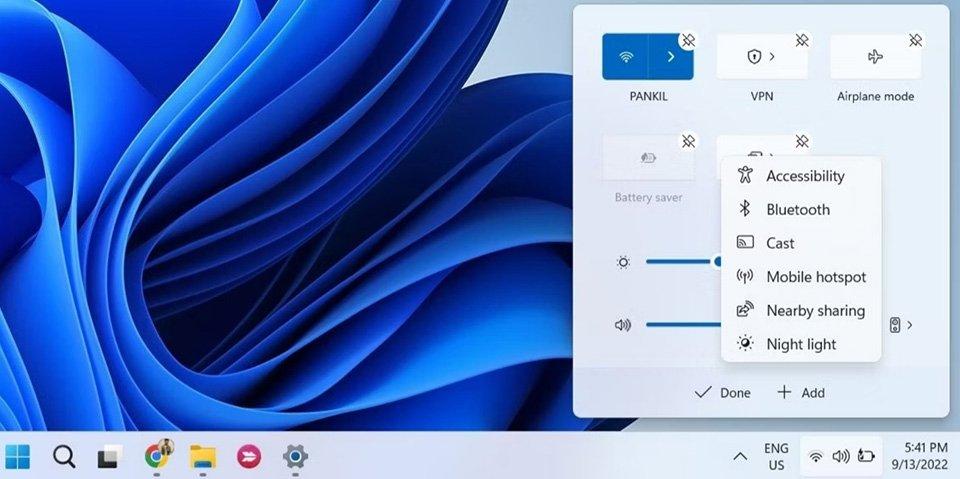
Users can open the Quick Settings panel by clicking the speaker icon in the bottom-right corner of the taskbar. From there, they select the arrow beside Bluetooth, turn Bluetooth on, and put their headphones into pairing mode.
Once the headphones appear in the available device list, selecting them should complete the connection.
However, Microsoft's Bluetooth experience has not always been consistent. The original article notes that Microsoft was still working to improve Windows 11 Bluetooth performance as of September 2026.
This matters because Bluetooth is no longer an optional convenience. It is part of the basic equipment people use every day.
Wireless headphones are used for video conferences, customer support, online education, remote work, and business communication.
When the connection fails, productivity suffers.
What Is New. Three Ways to Connect Bluetooth Headphones
Windows 11 provides three practical ways to connect wireless headphones.
Quick Settings
This is the fastest method for most users.
-
Click the speaker icon in the taskbar.
-
Select the arrow next to Bluetooth.
-
Make sure Bluetooth is turned on.
-
Put your headphones into pairing mode.
-
Select your headphones when they appear.
The headphones should connect within a few moments.
Windows Settings
For users who prefer a more complete configuration, Windows provides another option.
-
Press Win + I to open Settings.
-
Select Bluetooth & devices.
-
Turn Bluetooth on.
-
Click Add device.
-
Select Bluetooth.
-
Put your headphones into pairing mode.
-
Select the headphones when Windows discovers them.
This method is particularly useful when connecting a device for the first time.
Microsoft Swift Pair
Swift Pair is designed to make connecting supported Bluetooth accessories easier.
Instead of manually searching through a device list, Windows can recognize a compatible accessory and display a connection notification.
Users simply turn on Bluetooth, activate pairing mode on their headphones, and wait for the notification.
Click Connect, and the device can be paired.
Products such as the Sony WH-1000XM6 and Samsung Galaxy Buds 4 Pro support this feature, alongside previous models in those product families.
After pairing, supported devices can connect to the PC more conveniently.
The bigger idea is simple. Technology should reduce the number of steps between a person and the task they want to complete.
How Businesses Create Value From Better Wireless Connectivity
Bluetooth headphones are consumer products, but their economic value extends into the workplace.
Consider a small company with 20 employees.
If each employee loses just five minutes every working day dealing with audio connections, the business loses approximately 100 minutes of working time per day.
Over 20 working days, that becomes more than 33 hours.
The cost is not limited to the time spent fixing Bluetooth. Poor audio connections can also interrupt customer conversations, delay online meetings, and create a less professional experience.
This creates value for several parts of the technology industry.
Hardware manufacturers
Companies such as Sony and Samsung compete through sound quality, battery life, comfort, noise cancellation, and convenient connectivity.
Swift Pair support can make their products more attractive to Windows users because the purchasing decision is not based on sound quality alone. Ease of use matters too.
Microsoft
Microsoft benefits when Windows becomes a reliable platform for connecting different devices.
The operating system is not simply a place to run applications. It is the center of a user's digital working environment.
Bluetooth reliability contributes to the overall value of that environment.
Businesses and IT service providers
Companies that configure computers, manage wireless drivers, and provide technical support can reduce recurring problems by standardizing equipment and maintaining software updates.
A small improvement across hundreds of computers can save considerable time.
The Risks. Bluetooth Is Still a Weak Link in the User Experience
The biggest problem with Bluetooth is that users often cannot tell where the failure comes from.
The headphones might be working correctly. The computer might have an outdated wireless driver. Windows might fail to recognize the device, or an existing connection might interfere with the new pairing process.
This creates several risks.
Unnecessary hardware replacement
Users may assume their headphones are broken and purchase another pair when the actual problem is software-related.
Lost productivity
A failed connection before an important meeting can waste valuable time.
Inconsistent workplace equipment
Employees using different headphone models and computer configurations may experience different connection problems.
Dependence on software updates
Even expensive wireless headphones cannot guarantee a smooth experience if the computer's Bluetooth system is unstable.
When pairing fails, users should not immediately assume the headphones are defective.
Restarting the PC and checking for updated wireless drivers are sensible first steps.
How Businesses Will Be Affected by the Competition Between the United States and China
The larger technology industry is moving toward a more divided structure.
The United States and China are developing different technology ecosystems, with growing competition around semiconductors, artificial intelligence, operating systems, hardware manufacturing, and digital infrastructure.
Bluetooth headphone connectivity is not itself a major example of this separation. It is a useful reminder of something more fundamental.
The technology experience depends on multiple companies and components working together.
A headphone manufacturer can build excellent hardware, but the operating system still needs to recognize it. A computer manufacturer can produce powerful machines, but drivers and wireless components must work correctly.
In an increasingly divided global technology market, businesses need to pay attention to compatibility rather than simply choosing products based on brand reputation.
For European and American companies, this means evaluating hardware, software support, security, and long-term maintenance.
For businesses operating in Asian markets, including Vietnam, the same principle applies. Buying inexpensive equipment without checking compatibility can create higher operating costs later.
The future advantage will not belong only to companies producing the most advanced technology. It will also belong to companies that make different technologies work together reliably.
What Small and Medium-Sized Businesses Should Do
Small businesses do not need expensive IT departments to improve their Bluetooth experience.
They need a simple and consistent equipment strategy.
Standardize wireless equipment.
Avoid purchasing many different headphone models without testing them first. Choose a small number of compatible devices and establish them as workplace standards.
Check Swift Pair support.
When buying new headphones, consider whether they support convenient Windows pairing. This can reduce setup time for employees.
Maintain wireless drivers.
Keep Windows and wireless drivers updated. Outdated drivers can create connection problems that appear to be hardware failures.
Create a simple troubleshooting process.
Employees should know how to enable Bluetooth, enter pairing mode, reconnect devices, and restart their computers when necessary.
Evaluate total ownership costs.
Do not look only at the purchase price. Consider battery life, durability, compatibility, support, and the time required to maintain the equipment.
For a small company, predictable technology is often more valuable than impressive specifications.
If I Ran a Small or Micro Business, Here Is What I Would Do
I would not spend money replacing every pair of headphones because Windows 11 had connection problems.
I would approach the issue as an operational problem.
First, I would identify which computers and headphones are already working properly. Then I would create a small list of approved devices.
Second, I would test Bluetooth pairing on the actual Windows 11 computers employees use. A product that works perfectly on one machine may behave differently on another.
Third, I would prioritize three things when purchasing equipment:
-
Reliable connection with Windows 11.
-
Swift Pair support where available.
-
Good battery life and comfortable everyday use.
Fourth, I would create a short internal guide showing employees how to connect their headphones through Quick Settings and Windows Settings.
Finally, I would track recurring problems.
If one particular computer repeatedly loses Bluetooth connections, I would investigate its drivers and wireless hardware before purchasing replacement headphones.
This approach is inexpensive and practical.
Small businesses do not have the same budgets as large corporations. They cannot afford to waste money solving the wrong problem.
The smartest strategy is to fix the system before replacing the equipment.
Conclusion. The Best Technology Is the Technology People Do Not Have to Think About
Bluetooth headphones are a simple product, but connecting them to a computer reveals a larger lesson about modern technology.
Consumers increasingly expect devices to work together without complicated setup. They do not want to understand wireless drivers, operating system settings, or compatibility problems just to attend a meeting.
Windows 11 provides several ways to connect headphones, and Swift Pair makes the process easier for supported devices. However, connection reliability remains an important part of the overall experience.
For Microsoft, improving Bluetooth is about making Windows a better platform.
For Sony and Samsung, convenient connectivity strengthens the value of their hardware.
For small businesses, the lesson is even simpler. Reliable technology saves time, and saved time protects money.
In the AI era, companies are spending billions to build more powerful systems. But productivity does not always come from the biggest technological breakthrough.
Sometimes, it starts with something as ordinary as headphones connecting correctly the first time.
Windows 11 Bluetooth Problems. A Simple Headphone Connection Can Still Waste Your Time
Windows 11 Bluetooth, Bluetooth headphones, Windows 11 drivers, Microsoft Swift Pair, Bluetooth pairing, Sony WH-1000XM6, Samsung Galaxy Buds, wireless headphones, Windows connectivity, Bluetooth troubleshooting, small business technology, wireless productivity, AI technology competition, digital business efficiency
